Finding free entertainment on your phone seems simple, but the wrong choice can lead to security issues, unexpected charges, or access to unauthorized content. Therefore, apps for watching free movies should be carefully evaluated, especially when they promise huge catalogs, recent releases, or access without registration.
The main point isn't just downloading an app and pressing play. Before that, it's worth understanding if the service has permission to display the content, what permissions it requests, how the ads appear, and if the experience matches your usage habits.
Furthermore, the availability of films and series varies depending on the country, language, licensing agreements, and the platform's own business model. Therefore, an option that works well in one region may have a reduced catalog, a different name, or may not even be available in another.
What does it mean to watch free movies on your cell phone?
Watching movies for free on your mobile phone usually means using platforms that don't charge the user a direct monthly fee. In many cases, the service is supported by ads, distribution partnerships, or catalogs released for a limited time.
In practice, this is different from accessing pirated content. A free app can be legal when it has permission to display the films, presents clear terms of use, and is available in official stores or recognized channels.
A common example is the model where the user watches commercial breaks during the movie, similar to broadcast television. In this case, the direct financial cost may be zero, but there is still a trade-off: time, attention to the ads, and internet data usage.
On the other hand, when an app promises recently released movies, pay-TV channels, and exclusive series without explaining the origin of the content, a red flag should be raised. This type of promise can indicate legal, technical, and privacy risks.
Apps for watching free movies
When choosing an option, the first filter should be the legitimacy of the service. Well-known applications, published by identifiable companies and available in official stores, tend to offer more transparency than files sent via message or unknown websites.
It's also important to look at the type of catalog. Some free services offer older films, independent productions, documentaries, live channels, children's content, or region-licensed titles. This isn't a problem; in fact, it's often a more realistic sign of the free model.
For beginners, a good way to evaluate apps is to open their page in the official app store and read the description, the developer's name, the privacy policy, and recent reviews. Additionally, it's worth checking for clear information about ads, in-app purchases, and data collection.
Free services can be useful for those who want to watch something casually, save money on subscriptions, or discover different content. However, they don't replace all paid catalogs, especially when the goal is to keep up with specific releases or exclusive series.
How does the free model with ads work?
Many free apps use a model known as advertising during content. In simple terms, the platform grants access to the movie or series and displays ads before, during, or after playback.
This format can be legitimate when the user understands the exchange involved. Instead of paying a monthly fee, they agree to watch ads, create a free account, or share some basic usage data, according to the platform's policy.
In everyday use, this might work well for those who watch only a few movies a week or don't mind commercial breaks. However, for those seeking an uninterrupted experience, maximum image quality, and a wide catalog, the free version might seem limited.
Another important point is internet data consumption. Even without paying for the content, users can consume a significant amount of mobile data if they watch on 4G or 5G. Therefore, whenever possible, using a reliable Wi-Fi network helps avoid surprises in your data plan's usage.
How to assess if an app is safe before installing it.
The first analysis should happen before downloading. Check if the app appears in an official store, if the developer is identified, and if the page presents clear information about permissions, ads, in-app purchases, and privacy policy.
After that, check the recent reviews. Very old comments may not reflect the current state of the app, as updates change the interface, stability, ads, and even permissions requested.
It's also worth being wary of apps that request permissions unrelated to their main function. A movie player might need internet access and, in some cases, storage for authorized downloads. However, access to SMS, contacts, microphone, or accessibility features without clear justification warrants caution.
On Android, the platform's own security features help identify risks. Even so, no protection replaces the user's responsibility to avoid unknown APK files, links sent by groups, and promises of free unlocking of paid services.
A practical step-by-step guide to choosing a good option.
Start by defining what you really want to watch. If the intention is to watch classic movies, free channels, or varied content, a free app might work well. However, if the goal is to watch an exclusive series from a paid platform, the free option might not be suitable.
Next, search for the app in an official app store. Read the description carefully, check for any ads, and look for information about the developer. Also, verify that the app has recent updates and visible support.
After installing, do a short test. Open the app, browse the catalog, see how the ads appear, and check if playback works without excessive freezing. If the app asks for strange permissions right at the beginning, stop using it and review the installation.
Finally, keep track of registrations and payments. Even with free services, some apps offer paid plans, movie rentals, or in-app purchases. Therefore, read each screen before tapping "accept," "subscribe," or "continue.".
Common mistakes that can cause headaches
A common mistake is believing that all free apps work the same way. Some are legitimate services with ads, while others simply redirect the user to external pages, pop-ups, or suspicious files.
Another mistake is installing apps from outside official app stores unnecessarily. While there are legitimate situations for manual installation, this approach increases the risk for novice users, especially when the file comes from unknown websites or shared messages.
It's also common to ignore the subscription terms. Sometimes, the app offers a free trial but requires a credit card and automatically renews after a few days. In this case, the problem isn't necessarily a scam, but a failure to read the terms and conditions.
Furthermore, many people accept all permissions without analyzing them. This habit can expose personal data, notifications, and device information. When a permission doesn't make sense for watching videos, it's best to deny it and check if the app continues to function.
How to adapt the choice to your context.
Those living in Brazil may find different catalogs than those accessing the same service in other countries. This happens because exhibition rights are negotiated by region, language, and license period.
For families with children, extra care is needed. Before letting a child use your phone, check if the app has parental controls, age ratings, child profiles, or content filters. Also, monitor the ads displayed, as not all ads are suitable for all ages.
For those with simpler phones, the app's size also matters. Heavy apps can crash, drain the battery, and take up a lot of storage. In this case, a lighter version, playing it through a browser, or freeing up space can improve the experience.
Those who use prepaid internet need to monitor their data consumption. A high-quality movie can use up a significant amount of data, and this cost varies depending on resolution, viewing time, service provider, and plan.
Legal and digital security precautions
Free access to movies does not mean automatic authorization for any content. Legitimate platforms usually disclose their terms of use, the origin of their catalog, and their monetization methods, even if in a summarized way.
Apps that promise to unlock paid channels, recent releases, or catalogs of pay-TV services for free may involve illegal distribution. Beyond the legal issues, this environment is often more prone to intrusive ads, abusive data collection, and the installation of unwanted software.
In Brazil, public agencies already treat the fight against audiovisual piracy as an issue also linked to digital security. This reinforces the importance of avoiding clandestine services, especially when they require installation outside of the official store or access via modified devices.
In practice, the rule is simple: if the app doesn't explain who is offering the content, doesn't present clear terms, and relies on suspicious shortcuts, the free offer can end up being expensive. Security, privacy, and legality should outweigh the promise of an unlimited catalog.
How to compare options without falling for exaggerated promises.
First, compare the service model. A free app with ads, a limited catalog, and an identified developer is more consistent than an unknown platform promising all releases without any explanation.
Next, evaluate the actual experience. See if the movies load properly, if the subtitles work, if there's an option for Portuguese audio, and if the ads appear predictably. A simple but stable interface can be better than an app full of confusing menus.
Another useful criterion is to consider compatibility. Some apps work better on Android phones, others on smart TVs, tablets, or web browsers. If you intend to mirror content on your TV, check if the feature exists before relying on it.
Also compare data transparency. A platform that explains what information it collects, how it uses ads, and how to cancel an account offers more security to the user than an app without a clear policy.
Limits of what you can do alone
The user can evaluate many things on their own: official store, developer, permissions, reviews, ads, and catalog clarity. These steps already significantly reduce the risk of installing a problematic app.
However, some situations require specialized support. If your phone has started opening pages on its own, installing apps without authorization, overheating abnormally, or displaying strange charges, you may need to seek reliable technical support.
It's also worth seeking guidance when there are incorrect charges, unrecognized subscriptions, or difficulty canceling a service. In these cases, gather proof, screenshots, emails, and payment history before contacting the company, app store, or consumer protection agency.
When the issue involves copyright, commercial use of content, public display, or sharing within groups, the situation ceases to be merely technical. For companies, schools, churches, events, and establishments, proper legal guidance can prevent bigger problems.
Ongoing care after installation
Installation does not end the evaluation. After a few days of use, check if the app starts sending too many notifications, requesting new permissions, or displaying ads outside of the playback environment.
Keep the app updated only through official channels. Updates fix bugs, improve stability, and adjust compatibility with newer system versions. However, if an update significantly worsens the experience, read recent reviews before persisting with its use.
Regularly review the apps installed on your phone. If you no longer use a platform, remove the app and check for any active accounts, subscriptions, or permissions. This habit helps reduce data exposure and free up storage space.
It's also wise to check the permissions on your device's system. An entertainment app doesn't need permanent access to sensitive resources without a clear justification. When in doubt, remove the permission and see if the main function remains available.
A practical rule for making a safe decision.
A good decision involves three questions: Is the app legal? Is the app safe? Does the app meet my needs without creating extra problems? If any of these answers are too uncertain, it's worth looking for another option.
Beginner users can follow a simple rule: prefer apps from official stores, with identified developers, consistent reviews, accessible privacy policies, and a catalog compatible with a realistic free model.
For those with more experience, the analysis may include permissions, developer reputation, stability of the latest version, data consumption, and availability by region. Even so, the logic remains the same: a promise that is too big requires greater caution.
When in doubt, choose the most transparent option. A smaller, but well-organized catalog is usually better than a huge library with no clear origin, especially when it comes to digital security and exhibition rights.
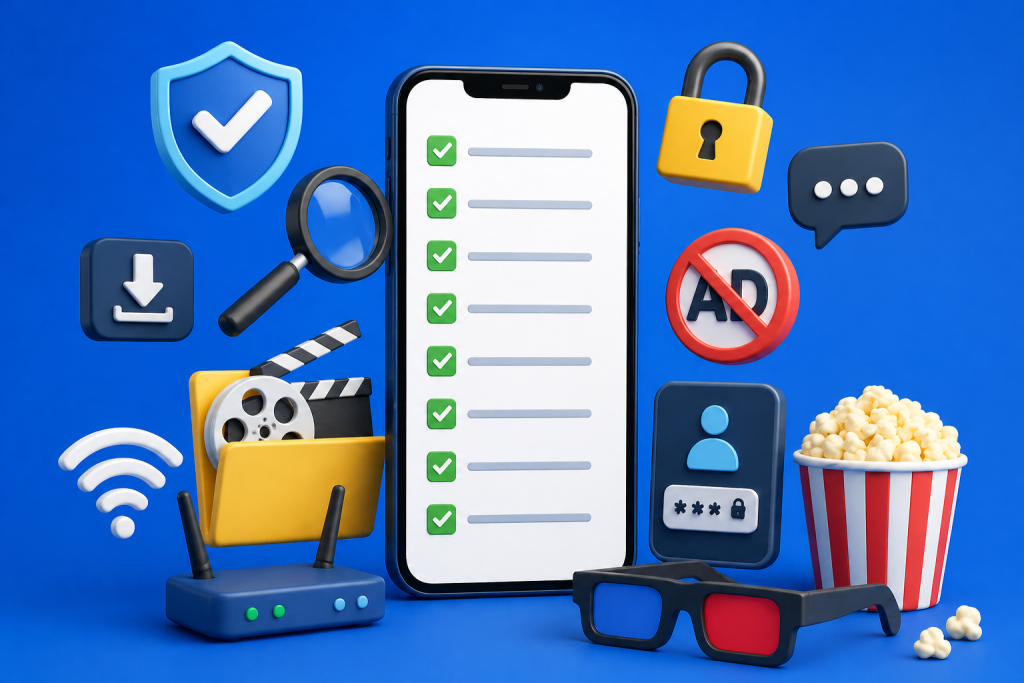
Practical checklist
- Before installing, check if the app is available in an official store.
- Read the developer's name and confirm that it seems consistent with the service offered.
- Check if the page displays ads, in-app purchases, or optional paid plans.
- Check recent reviews, not just the overall rating displayed in the store.
- Analyze whether the catalog appears compatible with a free and legal service.
- Avoid files sent through groups, private messages, or unknown websites.
- Refuse permissions that are not clearly related to video playback.
- Test the app for a few minutes before creating an account or adding a payment method.
- Use reliable Wi-Fi when watching long content on your mobile phone.
- Review active subscriptions in your app store account after any free trial.
- Remove apps that display ads outside the main screen or open pages on their own.
- Keep screenshots and receipts in case of an unrecognized charge.
- Consult technical support if the phone exhibits strange behavior after installation.
- Avoid services that promise to unlock paid platforms without explaining the origin of the content.
Conclusion
Watching movies on your phone without a monthly fee can be a practical alternative, as long as the choice is made carefully. Users gain more security when they understand the free model, verify the app's origin, and avoid promises that seem incompatible with reality.
The main concern is balancing convenience, legality, privacy, and quality of experience. A free app doesn't need to be perfect, but it should be transparent, secure, and appropriate for the type of content it offers.
Have you ever struggled to determine if a movie app was truly trustworthy? What was the main sign that raised doubts when installing it?
Are there any specific situations, such as charges, excessive advertising, or strange permissions, that still make you feel insecure about using this type of service?
Common questions
Is it safe to watch free movies on your cell phone?
It can be safe when the app comes from an official store, has an identified developer, and explains its operating model. Even so, it's important to review permissions, advertisements, and recent reviews before using it frequently.
Are all free movie apps pirated?
No. There are free services supported by ads, licensed catalogs, or region-specific content. The problem arises when the app promises unauthorized access to paid channels, new releases, or closed platforms without clear permission.
Why does the catalog change from one country to another?
Movies and TV series depend on licensing agreements. Therefore, a title available in one region may not appear in another, even within the same app.
Do I need to register a card to use the free app?
Not always. Some free services work without a card, while others offer trials, optional plans, or content rentals. Before providing payment information, read the terms and conditions and check if there is automatic renewal.
What to do if the app asks for too many permissions?
Deny permissions unrelated to watching videos and check if the app continues to function. If it requests access to contacts, SMS, notifications, or sensitive resources without explanation, consider removing the app.
Do free apps consume a lot of data?
They can consume a lot of data, especially in long films and high resolutions. Data usage varies depending on image quality, content duration, connection type, and app settings.
Can I use these apps on my TV?
It depends on the app and the device. Some offer versions for smart TVs, Chromecast, or screen mirroring, while others only work on mobile phones.
When should I seek technical assistance?
Seek help if your phone starts installing apps on its own, opening ads outside of apps, overheating, freezing frequently, or displaying unknown charges. These signs may indicate a technical problem or improper installation.
Useful references
Google Play — secure app installation: Google Play — downloads
Google Play — protection against harmful apps: Google Play — security
Anatel and Ancine — combating audiovisual piracy: Anatel — piracy