Apps to summarize long texts and study faster on your phone.
 Put Mobailes Editorial Staff
1
Put Mobailes Editorial Staff
1
Finding ways to study more efficiently has become a necessity for students, professionals, and anyone who needs to handle large volumes of information. In this scenario, the apps for summarizing texts They gained popularity for helping to quickly identify the main concepts in documents, articles, digital books, and study materials.
These apps use artificial intelligence and natural language processing to condense lengthy content without requiring the user to read every line before understanding the subject. Despite this, they do not replace complete reading when the goal is to deepen knowledge or interpret important details.
In this article, you will understand how these tools work, which features really make a difference in your study routine, what precautions to take when using them, and how to choose the most suitable option for different user profiles.
What are text summarization apps and how do they work?
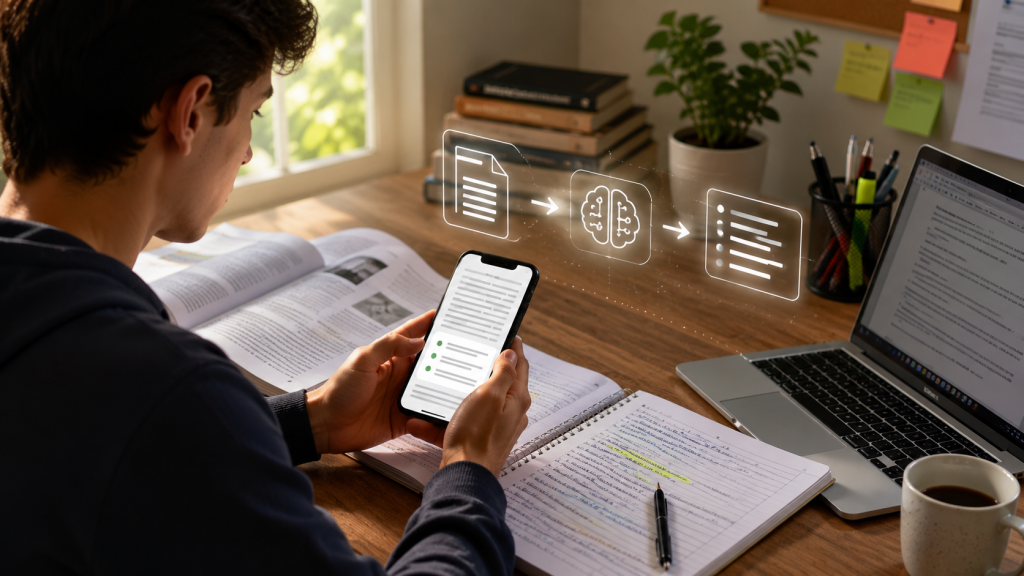
Summarizing apps analyze written content and identify the most relevant information. The result can appear as short paragraphs, bullet points, keywords, or even study maps, depending on the platform used.
The latest solutions utilize artificial intelligence models capable of understanding the context of the text instead of simply eliminating phrases considered less important. This makes the summaries more organized and closer to natural language.
In practice, the user typically sends a PDF file, pastes text, shares a link, or imports a document stored on their phone. After a few seconds, the app displays a summarized version of the content.
Some tools also allow you to choose the level of detail. Instead of generating just a short summary, you can request more complete versions for review before a test or presentation.
What types of content can be summarized?
Most current platforms offer support for different file formats and information sources. This greatly expands the possibilities for everyday use.
- Articles published on the internet.
- PDF files.
- Word documents.
- Digital books.
- Personal notes.
- Materials digitized through photography.
- Lecture transcripts.
- Content shared via links.
Some applications can also interpret presentations, images containing text, and videos through automatic transcription before generating the summary.
How artificial intelligence improves summaries.
Early automatic summarizers often selected phrases from the original text without fully understanding the context. This frequently resulted in disjointed content.
Current models analyze relationships between ideas, identify key concepts, and reorganize information to produce a more fluid reading experience. Even so, quality depends on the clarity of the submitted document.
When a text contains digitization errors, low-quality images, or incomplete sentences, the summary may also have limitations. Therefore, reviewing the result remains an important step.
When a summary really helps with learning.
The summary works best as a study aid, not as a substitute for the original material.
Imagine a university student who needs to review dozens of pages before an exam. Rereading all the content can take several hours. A summary allows them to quickly recall the main concepts before returning to the sections that require more attention.
The same applies to professionals who receive lengthy reports or researchers who need to quickly identify whether a particular document warrants a full reading.
In other words, summarizing speeds up the identification of the most relevant information, but it does not eliminate the need for critical interpretation.
Key features that make a difference when studying.
Not all apps offer just the function of summarizing texts. Many have evolved into complete study organization platforms, bringing together different tools in a single environment.
Knowing these features helps you choose an app that truly fits your routine, avoiding the installation of solutions that only offer basic functions.
Summary at different levels of depth
One particularly useful feature is the ability to adjust the size of the summary.
In some situations, simply visualizing the main topics is sufficient. In others, it may be helpful to generate a more detailed summary, while preserving important explanations from the original content.
This flexibility allows you to adapt the material according to the time available for review.
Importing PDFs and documents
Much of the study material today is in PDF format. Handouts, scientific articles, manuals, and e-books are common examples.
Applications that allow importing these files directly from your mobile phone make the process more practical, eliminating the need for conversions before analysis.
Some platforms also accept documents in formats such as DOCX, TXT, and presentations, expanding the possibilities for use.
Summaries of web pages
Another interesting feature is reading web pages.
Instead of manually copying the content, some applications can interpret the provided address and automatically generate a summary, facilitating quick searches during studies.
When available, this feature usually works best on structured pages with accessible text.
Automatic flashcards
Some apps transform the summary into question-and-answer flashcards.
This strategy encourages the active retrieval of information, a technique widely used by students preparing for competitive exams, college entrance exams, and university courses.
By answering questions instead of simply rereading a text, it becomes easier to identify which topics still need revision.
Quizzes to review the content.
In addition to flashcards, several platforms can create short quizzes based on the material submitted.
These exercises help to verify that the main concepts have truly been understood before moving on to a new topic.
Although they don't replace formal assessments, they can be useful for organizing study routines and tracking progress over time.
Organizing notes
Some tools allow you to bring together summaries, personal observations, and imported materials in a single space.
This reduces the time spent searching for files scattered across different applications and facilitates future revisions.
For those who study daily using their cell phones, keeping all their content organized can make a significant difference in productivity.
Among the solutions currently available, there are platforms specifically designed to transform PDFs, audio files, and other materials into structured summaries and review resources, demonstrating how artificial intelligence is being incorporated into study routines. Studix It is Aprivia These are examples of this type of approach, while native features are also beginning to appear in compatible operating systems, such as the page summary function available in recent versions of Safari with Apple Intelligence. Apple Support
Caution when using study summary apps
Despite their practicality, it's important to understand that no application can perfectly interpret text in all situations. The quality of the result depends both on the technology used and the organization of the submitted material.
When studying technical, legal, scientific, or medical subjects, small omissions can alter the understanding of a concept. Therefore, a summary should serve as a support for review, and not as the sole source of reference.
Always review the original content.
A summary helps to quickly identify the key ideas, but it doesn't replace a complete reading when the goal is to learn a topic in depth.
If there are doubts about an important concept, it is worth returning to the original passage to check the context and understand how that information was presented.
Avoid sending confidential documents.
Before using any artificial intelligence-based tool, read the service's privacy policy.
Documents containing personal information, contracts, financial data, or confidential files deserve special attention. Whenever possible, use platforms that transparently explain how data is processed and stored.
Check if the app meets your needs.
Not every tool was created for the same type of use.
Some prioritize speed, while others offer features such as study organization, question generation, flashcard creation, or audio transcription.
Before installing an application, it's worth noting:
- Accepted file types.
- Available for Android and iPhone.
- Limitations of the free version.
- Supported languages.
- Option to export summaries.
- Additional resources for review.
How to choose the best app for your routine.
There is no single ideal option for all user profiles. The best choice depends on how you study and the type of content you usually analyze.
For students
Those who review handouts, books, and PDFs often benefit from apps that offer summaries, flashcards, quizzes, and note-taking organization all in one place.
For professionals
Those who work with reports, proposals, research, or extensive documentation may prioritize tools capable of quickly summarizing documents and making it easier to locate the most relevant information.
For daily reading
Users who follow news, articles, or educational content generally find more value in applications that summarize web pages and allow sharing text directly from the browser.
Best practices for studying better using summaries.
Summarizing becomes more useful when it's part of an organized learning strategy.
After generating a summarized version of the content, try to identify the main concepts and record, in your own words, what you understood. This process helps to retain the information.
It is also interesting to alternate between different study methods, such as complete reading, solving exercises, spaced repetition, and creating mind maps when the subject requires greater depth of understanding.
Another important practice is to compare the automatically generated summary with the original document. This helps identify points that deserve additional attention and prevents relevant details from going unnoticed.
Practical checklist
- Choose an app that is compatible with the type of material you use.
- Check if it accepts PDFs, documents, or web pages according to your needs.
- Use the summaries as a supplement to your studies, not as a replacement for the original content.
- Review important concepts directly from the source when in doubt.
- Protect documents that contain sensitive information.
- Try different summary formats to find out which one makes learning easier for you.
- Combine summaries with periodic reviews and solving exercises.
Conclusion
Summarizing apps represent a practical alternative for organizing studies and handling large volumes of information directly from your mobile phone. With the advancement of artificial intelligence, these tools have begun to offer features that go beyond simply reducing text, including the creation of flashcards, quizzes, and the organization of materials.
At the same time, it's important to use them consciously. Reading the original content remains essential when the goal is to understand details, develop critical thinking, or study complex subjects.
By choosing a tool that suits your routine and combining its features with good study habits, it's possible to make the review process more organized, maintaining focus on understanding the content and not just on reading speed.
Common questions
Do summary apps replace reading in the entire book?
No. They help to quickly identify the main points of a text, but reading the entire text remains important to understand details, arguments, and context.
Do these apps only work with PDFs?
No. Many tools accept copied text, documents, images, web pages, presentations, and other formats, depending on the features offered.
Can I use summary apps to study for exams?
Yes. They can facilitate reviewing and organizing content, especially when combined with methods such as exercises, note-taking, and periodic reviews.
Could summaries generated by artificial intelligence contain errors?
Yes. Although current models are quite advanced, incomplete interpretations or omissions can occur. Therefore, it's always worth checking the most important information in the original material.
Is it worth using the free version of these apps?
For many users, yes. Several platforms offer enough resources to test the tool and verify if it meets the needs of their study routine before considering a paid plan.